





Table of Contents
Patrick Cranston, President at Cranston IT, notes: “Start with the tickets people complain about every week, then trace them back to systems, ownership, budget, and the next quarterly decision.”
Approvals stall when the file server lags. Invoices wait when the accounting app drops offline. A new hire loses half a day because the laptop, Microsoft 365 account, phone extension, and shared folders weren’t ready together.
A practical IT business strategy turns those interruptions into a quarterly operating rhythm. Many plans fail because teams create them once, file them away, and never build a review habit. A recent Gartner report suggests only 23% of CIOs rate their organization as effective at business strategy and planning. Start with support patterns, aging devices, security uncertainty, and workflows where people lose time.
What Is An IT Strategy That Leaders Can Actually Use
A useful IT strategy should fit on one page before it becomes a full roadmap. If it takes a binder to understand the next decision, it won’t help when someone needs to approve laptop replacements, choose between a cloud migration and a phone system upgrade, or decide whether a recurring ticket pattern deserves project funding.
-
Business goals first: Tie technology choices to uptime, workflow efficiency, cost control, and customer response times.
-
Current systems mapped: List core apps, devices, servers, cloud tools, vendors, and recurring ticket themes.
-
Risks and priorities: Note security gaps, backup status, access issues, aging hardware, and missed review dates.
-
Owners and dates: Assign budget owners, follow-up owners, and quarterly review checkpoints.
Make the core areas easy to see: network stability, cloud planning, security monitoring, and user support. Then turn findings into decisions, owners, and follow-up work.
Build An IT Strategy Around The Work People Do Every Day
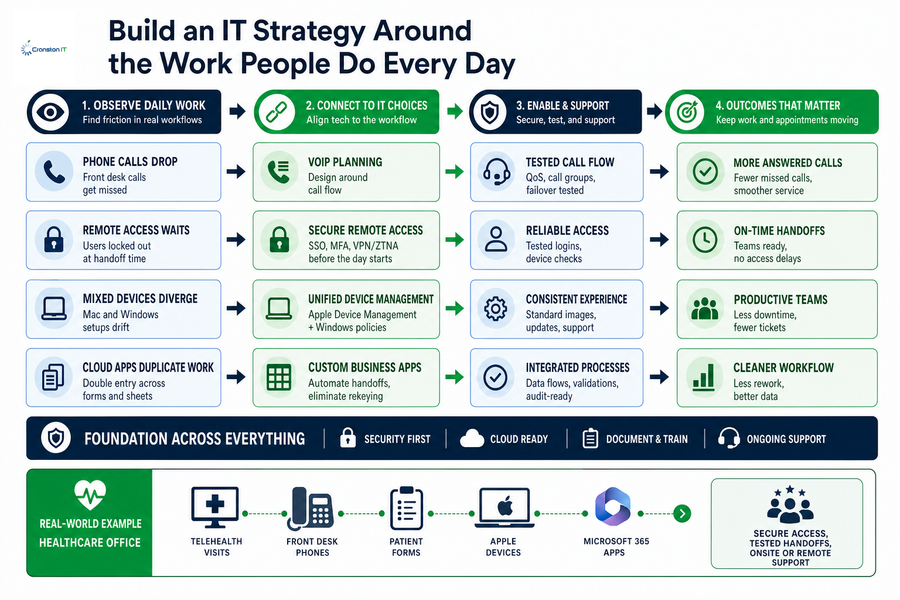
Strategy starts by watching where work slows down, not by shopping for tools. That’s the practical answer to what is an IT strategy: a way to connect technology choices to the work people repeat every day, from answering calls to approving invoices.
-
Phone calls drop: VoIP planning should follow front desk call flow, missed-call patterns, and customer wait times.
-
Remote access waits: Remote users need secure access before the morning customer handoff, not after a ticket backlog forms.
-
Mixed devices diverge: Mac and Windows users need consistent onboarding, Apple Device Management, and shared process steps.
-
Cloud apps duplicate work: Custom business applications can reduce double entry between forms, spreadsheets, and billing systems.
A healthcare office may run telehealth visits, front desk phones, patient forms, Apple devices, and Microsoft 365 at once. The strategy should show how secure access, tested handoffs, and onsite or remote support keep appointments moving. It should also make clear who owns the next fix when a form doesn’t sync, a call route fails, or a remote clinician can’t reach the right file.
Turn A Business IT Strategy Into Security And Continuity Decisions
Security belongs in the operating plan because downtime, data loss, and access problems interrupt revenue, service delivery, and client trust. A Free IT Security Review is a practical first step because it turns concerns into clear decisions about monitoring, backups, access, and response.
-
Protect every active endpoint: Workstations, laptops, and mobile devices need endpoint protection, patch management, and monitoring.
-
Tighten user access rules: Role-based access keeps former employee accounts from staying connected to email, files, or cloud apps.
-
Check backups on schedule: Backup monitoring matters when payroll files, patient forms, or client records need to be restored.
-
Plan continuity before disruption: Business continuity planning defines who communicates, which systems return first, and how teams keep serving clients.
-
Keep leadership involved: CISA’s updated Cybersecurity Performance Goals include Govern, focusing on oversight, supply chain risk, Zero Trust, and incident communications. That keeps an IT business strategy connected to business risk.
More IT Planning Guides
Use IT Strategy For Business Budgeting And Quarterly Planning
Change is hard when teams are already busy, so the plan becomes useful when it separates predictable run costs from planned improvement projects. Forrester reports 86% of tech leaders across industries expect increased budgets from the year before, which makes disciplined quarterly planning more important than another year of surprise repairs.
-
Set quarterly priorities: Use a custom roadmap for hardware refreshes, Microsoft 365 changes, and security work.
-
Separate support costs: Cranston IT’s flat-rate MSP structure, fixed per device with security priced per user, helps reserve budget for growth work.
-
Plan platform moves: Cloud consulting, Apple deployment, VoIP, and custom applications should map to deadlines and user handoffs.
-
Review AI readiness: AI planning should cover data access, policy, and security before staff upload customer files into new tools.
Blocks of hours fit when there’s a compelling need outside an MSP contract, but routine support, planned projects, and security responsibilities should be easy to separate during each quarterly review.
Turn IT Planning Into Action
Build a quarterly IT strategy tied to tickets, systems, budget, and security. Cranston IT can help you create a plan your team will use.
Keep The Plan Moving With An IT Business Strategy Partner
The right IT strategy for business starts by assessing current systems, aligning technology with goals, building security early, funding the roadmap, and reviewing it every quarter.
At Cranston IT, we bring 20 years in business and 100 years of combined experience to managed support, security monitoring, cloud guidance, Apple integration, and quarterly review habits that keep the plan connected to real tickets, devices, users, and deadlines.
Contact us to claim a Free IT Security Review, and if cloud risk is part of the conversation, ask about 30 free days of Cloud Security Monitoring so delayed invoices, stalled approvals, and scattered support tickets become planning inputs instead of recurring friction. For a deeper look at planning support, read our sister article on the benefits of IT consulting.