





Table of Contents
A team buys a campaign platform on a company card. Someone else orders laptops. A phone system renewal lands in finance with no clear owner. Soon, onboarding slows, duplicate tools pile up, and access reviews get messy.
That’s why people ask, “what is IT procurement”. It’s the business process that keeps technology purchases connected to daily work, security, support, and budget planning. With 88% of IT decision-makers open to switching some vendors and 86% expecting higher budgets, cleaner buying decisions matter before another invoice, renewal, or helpdesk ticket creates avoidable friction.
Brandon Dewar, Technical Manager at Cranston IT, notes: “Good procurement starts before the purchase order, when you confirm who needs the tool, who supports it, how access works, and what happens at renewal.”
What Is IT Procurement
Before approving another app, laptop, or cloud service, you need a shared definition that connects buying to support, security, and daily workflow.
-
Buying with purpose: IT procurement is the planned process of selecting, buying, configuring, tracking, and supporting the technology your business uses.
-
Managing vendor fit: It checks whether a vendor fits existing systems, Microsoft 365 licensing, Apple Device Management, cloud tools, and helpdesk workflows. With 61% of purchase influencers saying their organization has or will use a private genAI engine to support purchasing and 88% of IT decision-makers open to switching some tech vendors, fit still needs a clear business reason.
-
Protecting user access: It includes security review, password management, admin rights, and offboarding before a tool holds client files.
-
Planning device lifecycles: It tracks warranties, refresh timing, renewals, and support ownership, so vendor questions don’t become daily support issues.
What Is The IT Procurement Process For Daily Operations
Procurement shows up before anyone talks about contracts. It affects whether a new user has the right laptop, phone extension, cloud folders, and Microsoft 365 license on day one.
A new hire waits on a MacBook because nobody confirmed the approved model or management profile. A marketing team can’t access a campaign platform before launch because the admin account belongs to a departed employee. Finance gets invoices from tools nobody owns. That gets old fast.
The practical work is mapping purchases to the people who use, secure, and support them.
That means checking device standards, VoIP planning, cloud permissions, vendor accountability, and user onboarding before approval. Buying conversations are changing too: in 2025, 30% of all buyers viewed genAI tools as a meaningful interaction type during the final commit stage of their purchase, compared with 17% who said the same about interacting with product experts.
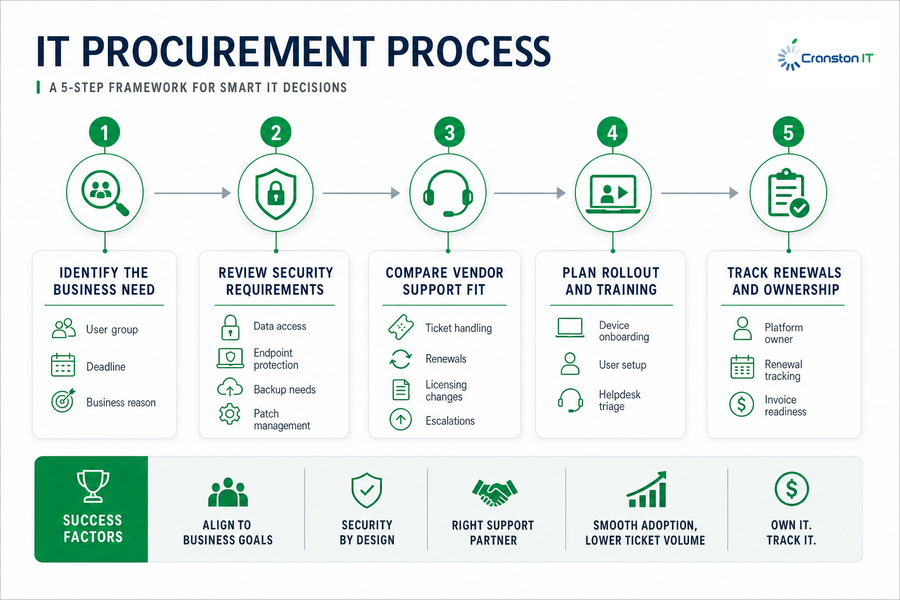
What Is IT Procurement Process
-
Identify the business need
Start with the workflow, not the product page. A request for tablets, call routing, or cloud storage should name the user group, deadline, and business reason. -
Review security requirements
Check data access, endpoint protection, backup needs, password management, and patch management before rollout. -
Compare vendor support fit
Confirm who handles tickets, renewals, licensing changes, and escalations when users get stuck. -
Plan rollout and training
Device onboarding, user setup, and helpdesk triage reduce avoidable tickets. For cloud migrations, business phone systems, and Apple device deployments, rollout planning matters as much as the purchase. -
Track renewals and ownership
Assign a platform owner before finance receives the next invoice. Tie renewals to budgeting, security review, and business technology planning.
Plan Your IT Spend Smarter
Why The IT Procurement Process Shapes Security And Budget Control
A department signs up for software with a company credit card, then later finds shared logins, no backup path, and an auto-renewal nobody budgeted for. That’s where asking what is IT procurement process becomes practical, not academic.
Unmanaged purchases create business risk because no one has checked access, data protection, support, or renewal terms. Procurement teams that use integrated operating models have reduced the cost of ordering materials and services by up to 52%.
-
Unclear license ownership: Finance receives invoices, but no one knows which team still uses the tool.
-
Weak access controls: Former users keep access when offboarding isn’t tied to the platform.
-
Missed renewal dates: Contracts renew before pricing, usage, or vendor fit gets reviewed.
-
No backup plan: Cloud data sits outside normal backup monitoring and incident review.
-
Hidden security friction: Vendor evaluations often include security proof up front, with 41% of organizations requiring vendors to demonstrate compliance with specific frameworks before moving past the initial evaluation phase.
Make IT Buying Easier
Cranston IT helps align procurement with security, support, renewals, and day-to-day workflows before the next purchase creates friction.
How IT Procurement Supports Cloud Voip And Apple Workflows
Different tools touch different parts of the business, so procurement needs more than a price check. A VoIP rollout affects call queues, number porting, and network readiness. A MacBook order affects deployment, updates, and user support. A custom app affects reporting, permissions, and team handoffs. We look at those details early because the purchase is only the start.
That’s why each category needs its own procurement checks before purchase.
-
Cloud tools: Confirm access, backup, admin ownership, cloud security monitoring, and Microsoft 365 integration.
-
VoIP systems: Confirm network readiness, call routing, desk phone needs, number porting, and rollout timing.
-
Apple devices: Confirm Apple Device Management, deployment profiles, updates, remote wipe, and user support.
-
Custom apps: Confirm workflow fit, permissions, reporting, maintenance ownership, and system connections.
-
Marketing platforms: Confirm admin ownership, campaign data access, user roles, and offboarding before launch.
Building An IT Procurement Routine That People Actually Follow
Changing buying habits takes coordination across leadership, finance, operations, and IT. The routine has to be simple enough for someone ordering a laptop, requesting software, or reviewing invoices, while still giving IT room to check security, support, and long-term fit. A clear intake process matters, since procurement functions are 21% less likely to face added complexity when they follow designed simplicity principles.
-
Create one intake path: Use a simple request form for hardware, software, cloud tools, and licenses.
-
Require support review: Check security, backup, vendor patching, access management, and helpdesk ownership before signing.
-
Maintain approved lists: Keep standard devices, apps, licensing options, and Apple deployment requirements easy to find.
-
Assign platform owners: Name the person responsible for each renewal, vendor relationship, and user access decision.
-
Review quarterly: Tie purchases to IT planning, budgeting, renewals, roadmap decisions, and vendor changes, especially when 88% of IT decision-makers are open to switching at least some tech vendors.
Simple wins when people can follow the process without slowing down the work.
Talk Through Your IT Procurement Plan With Cranston IT
Better procurement helps reduce rushed purchases, unclear ownership, security gaps, support delays, and tools that don’t fit daily work, from invoice approvals to cloud file access and VoIP call routing.
If you want help reviewing your process, planning purchases, improving cloud or business phone rollouts, managing Apple devices, or aligning IT decisions with business goals, we can talk through the next practical steps. Our work includes IT procurement consulting, flat-rate managed IT services with unlimited support for a fixed cost per device, Apple Device Management, cloud services, custom business applications, and security review options, including a Free IT Security Review and Free 30 days of Cloud Security Monitoring.
Start with the next purchase.