





Table of Contents
The front desk loses VoIP access while customers are calling about open orders. A manager is also waiting on Microsoft 365 permissions before payroll files can be approved. That is why the cost of it support for small business is an operations decision, not just a budget line. it support cost for small business depends on devices, users, response needs, security, cloud systems, and whether support is reactive or managed.
At Cranston IT, we look at tickets, endpoints, networks, cloud access, and cybersecurity together, with flat-rate managed IT support as one way to make planning clearer.
Brandon Dewar, Technical Manager at Cranston IT, notes: “Price support around the workflows that stop revenue first, phones, approvals, invoices, cloud access, and backups, then match response times to business impact.”
What Drives The Cost Of IT Support For Small Business
IT pricing is hard to compare because providers bundle helpdesk, monitoring, security, cloud support, and onsite work differently. A lower monthly number can exclude the ticket that stops invoicing at 4 p.m., so the real question is what’s covered, how fast issues move, and who owns the next step.
-
Device and user count: Workstations, laptops, Macs, shared devices, mobile devices, and cloud access all shape support effort. A warehouse tablet and an accounting laptop create different risks.
-
Support response needs: Helpdesk, remote support, onsite support, after-hours coverage, and ticket urgency affect staffing. If VoIP fails during customer calls, response time becomes a business tradeoff.
-
Security requirements: Endpoint protection, cloud monitoring, anti-phishing, password management, and backup oversight reduce risk before it becomes a recovery project.
-
Environment complexity: Microsoft 365, Apple devices, VoIP, wireless networks, cloud apps, and business software require coordination. We keep pricing clearer by avoiding multiple MSP contract levels, using flat-rate unlimited support per device and a per-user security package.
How IT Support Cost For Small Business Affects Daily Operations
Underfunded support usually appears as workflow friction before it becomes a formal outage. A stalled ticket, missing approval, or unreliable connection slows the work customers are waiting on.
-
Tickets slow revenue work: Unresolved access, printing, VoIP, or app issues delay invoices, scheduling, customer service, and approvals. Our ticket triage process routes issues quickly.
-
Permissions block key workflows: Microsoft 365 access, new hire setup, role changes, and offboarding affect payroll files, shared mailboxes, and client folders. A missed offboarding step leaves access active.
-
Network issues interrupt service: Wi-Fi, VPNs, servers, and cloud app access keep teams connected to customer-facing work. Support needs monitoring and escalation, not only a reboot.
-
Security gaps become costs: Phishing, ransomware, exposed endpoints, weak passwords, and cloud account compromise move fast — IBM’s Cost of a Data Breach Report puts the average U.S. breach at over $10 million. Security incident review, patch management, and backup monitoring reduce exposure.
-
Leadership loses cost visibility: Break-fix invoices make budgeting harder because each issue becomes a new approval. Predictable support gives you a clearer view of daily requirements.
Comparing IT Support Cost Models Without Guesswork
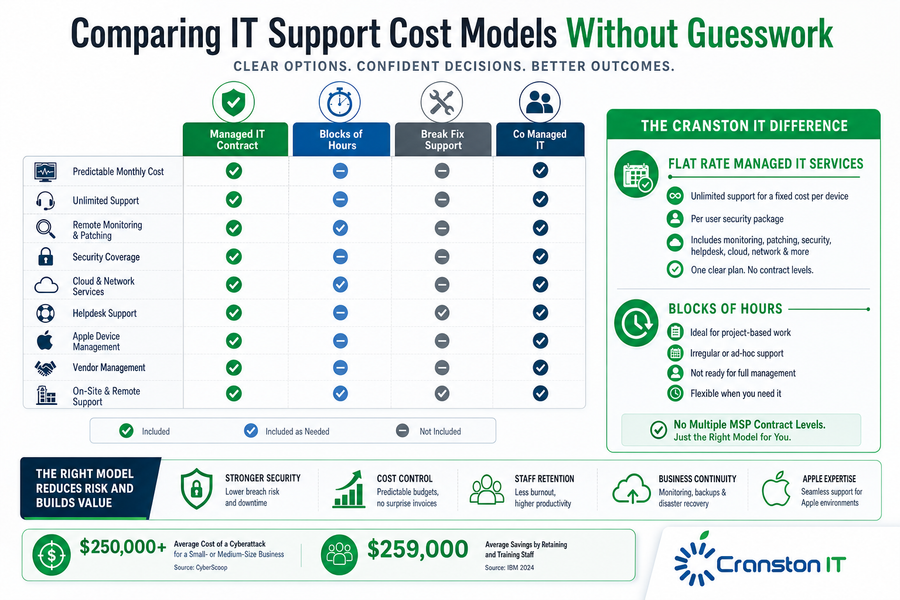
Changing support models is easier when each option is tied to ticket flow, prevention, and budget control, not only the IT support cost of a proposal. Managed IT services transfers responsibility for maintaining technology from the customer to the provider for a predictable fee.
-
Managed IT contract: Our model uses flat-rate managed IT services with unlimited support for a fixed cost per device plus a per-user security package. It includes monitoring, patching, security, helpdesk coverage, remote support, on-site support, disaster recovery, and cloud-based solutions.
-
Blocks of hours: Blocks work for project-based needs or irregular support. A planned Apple deployment or VoIP cleanup can fit when the scope is contained.
-
Break-fix support: Reactive help creates unpredictable invoices and leaves less room for prevention. The issue gets attention after work is already disrupted.
-
Co-managed IT: Internal teams use this for escalation, network services, Apple device management, cloud support, vendor management, or security coverage. We do not use multiple MSP contract levels, which keeps comparisons cleaner.
More On IT Support Costs
What To Include In The Cost Of IT Support Scope
A lower monthly number is not useful if backups, cloud security, onboarding, patching, or vendor management are excluded. When comparing the cost of IT support, ask what happens when a new employee needs access, a vendor blames the firewall, or a backup check fails before month-end close.
What this looks like in practice: A healthcare office needs secure patient data access, reliable VoIP, Microsoft 365 permissions, endpoint protection, and backup monitoring before Monday appointments begin.
If the scope excludes user onboarding or security alert review, the office manager becomes the coordinator. Our structured onboarding, typically completed within 2 weeks, helps define those handoffs early.
-
Inventory every device: Include laptops, desktops, Macs, shared workstations, servers, phones, and tablets.
-
Map critical workflows: Document billing, scheduling, approvals, customer communication, and file access.
-
Confirm security coverage: Small businesses are hit disproportionately hard — Verizon’s Data Breach Investigations Report found ransomware appears in the vast majority of SMB breaches, which is why endpoint protection and backup checks belong in scope, not as add-ons.
-
Define ticket expectations: Set response paths, escalation rules, onsite needs, after-hours coverage, and approval ownership.
Clarify Your IT Support Costs
See what should be included in your support scope so pricing aligns with users, devices, security, and response needs. Cranston IT can help.
Understanding The Average Cost Of IT Support Services Before You Choose
The average cost of IT support services matters less than knowing what is included, what is excluded, and how fast problems are resolved. A quote that covers laptops but excludes Microsoft 365 administration, VoIP vendors, Apple devices, or backup reviews leaves gaps that show up during real work.
Cranston IT supports 1,182 end users, has 20 years in business, and reports a 6-minute average response time with an 11-minute average resolution time.
Use those details to evaluate process, not market averages.
Key capability areas include helpdesk support, cybersecurity monitoring, Microsoft 365 administration, and backup management.
-
Ask what is covered: Clarify devices, users, cloud apps, servers, VoIP, Apple devices, and vendor issues.
-
Ask how issues flow: Confirm ticket submission, triage, escalation, after-hours support, and onsite dispatch.
-
Ask what gets reviewed: Review security alerts, backup checks, patch status, onboarding, offboarding, and compliance needs.
Plan The Cost Of IT Support Around Business Growth
When a project manager waits on Microsoft 365 permissions or a receptionist loses VoIP access, IT support pricing becomes an operational decision. Evaluate support through uptime, security, workflow continuity, user productivity, and predictable budgeting, especially when Microsoft 365, Apple devices, cloud services, phones, and custom applications touch daily work.
We can help you review what you have today, where support gaps create risk, and whether flat-rate managed IT, cybersecurity monitoring, or project-based help fits best. If you want a practical starting point, contact Cranston IT about a free IT Security Review or free 30 days of Cloud Security Monitoring. Let’s get started.